How it works

How the proposed store works.

A plain-language walk through the setup, what happens when someone buys, what we have proven so far, and who sees what. This is a concept demo for discussion. It is not the final design or a working store.

The setup

Two parts that work as one site.

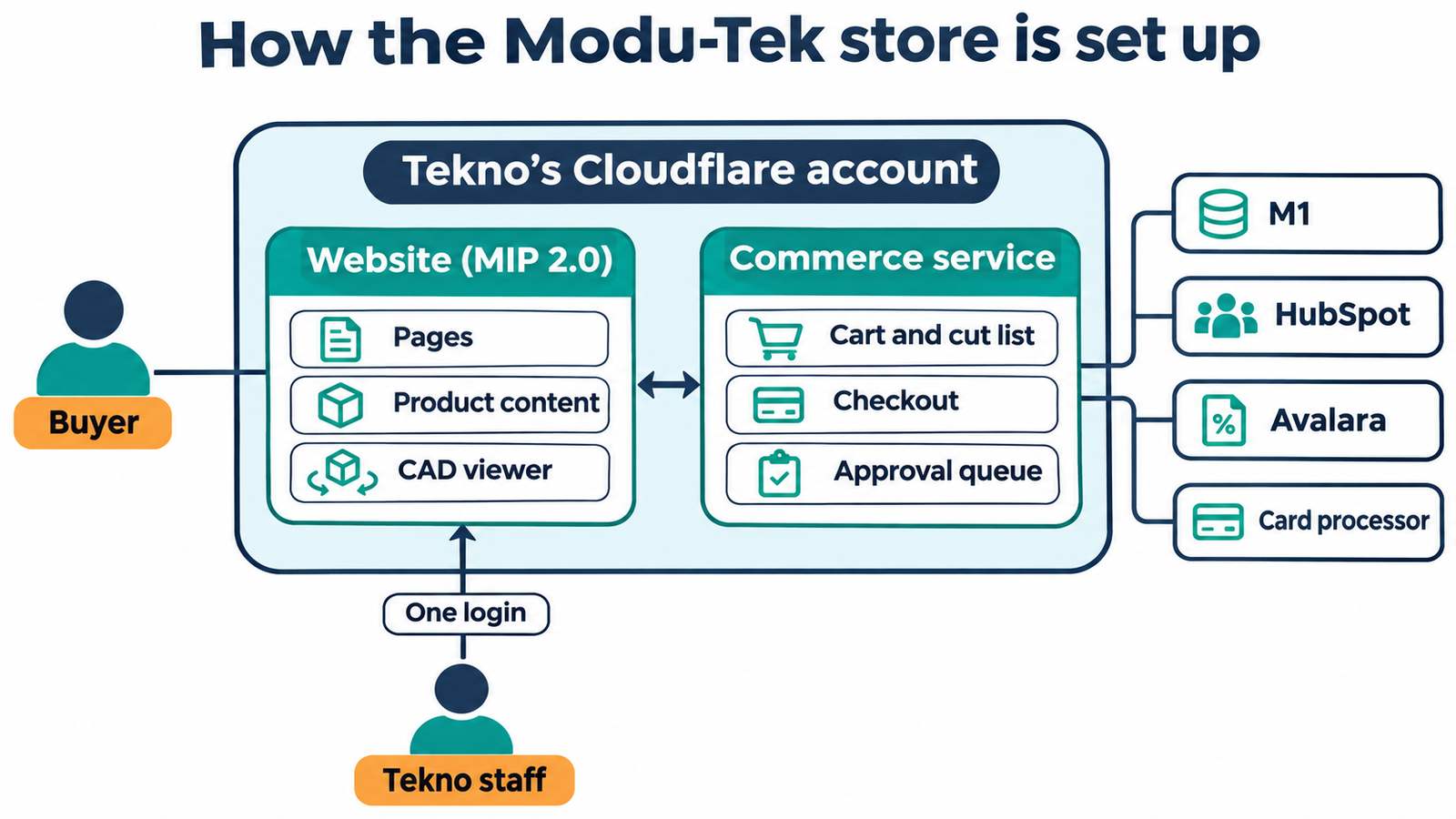
The store has two parts. Both run in Tekno's Cloudflare account.

  • The website, on Five Q's MIP 2.0 platform. It shows every public page: home, categories, product pages, guides and the CAD viewer. Tekno's team edits words, photos and pages in the MIP admin.
  • The commerce service, built by Five Q for this store. It handles everything that involves money, customers or M1: the cart and cut list, buyer accounts, checkout, the card form, the approval queues, and the connections to M1, HubSpot, Avalara and shipping rates.

Buyers see one site. Tekno staff use one login for content and the order queues. Keeping the two parts apart means a website update can't break an order.

An order, step by step

What happens when someone buys.

Example: an engineer orders four rails cut to 18 inches and a bag of brackets.

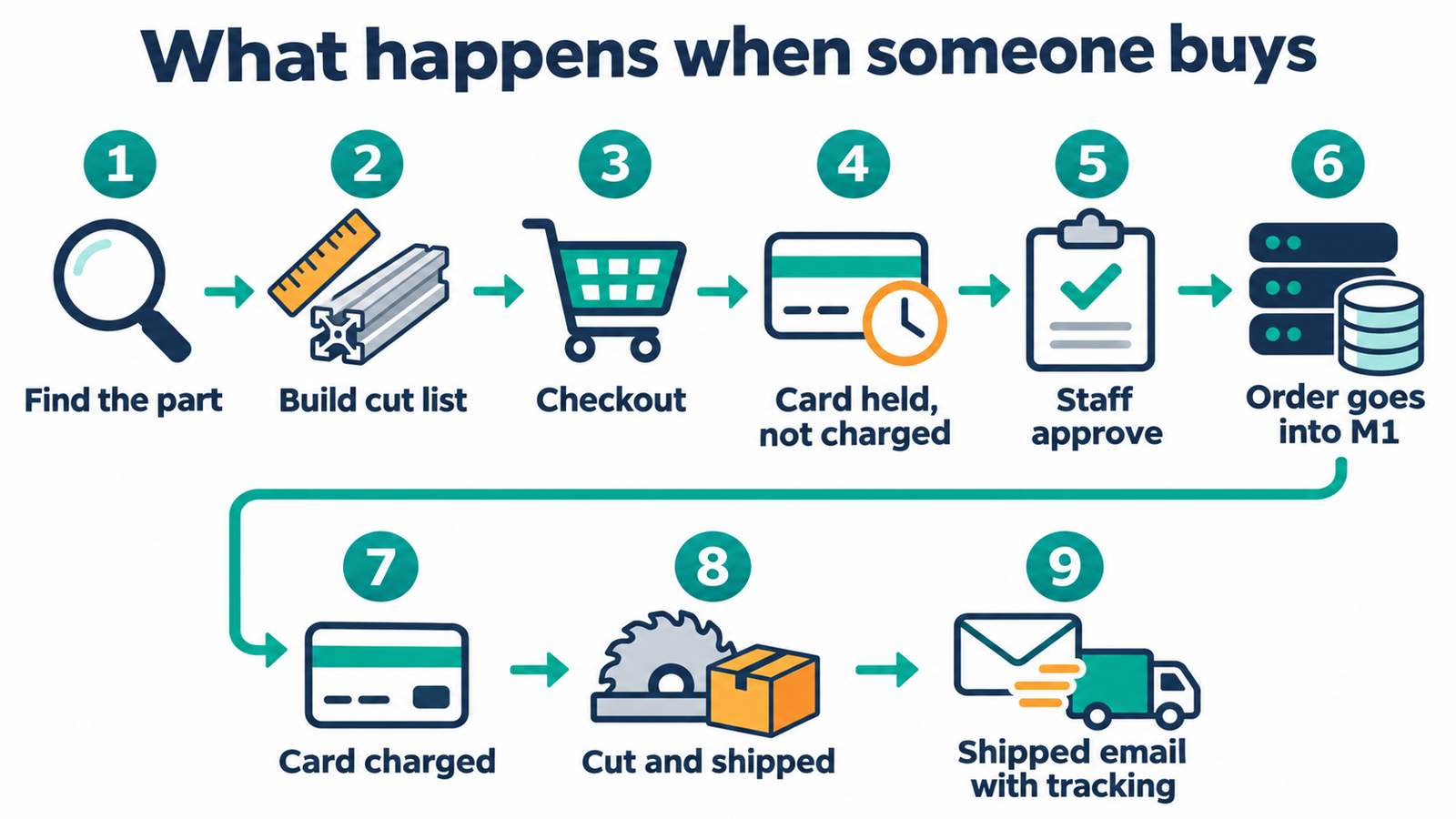
  1. Find the part. They land on a product page from Google or site search. No login needed.
  2. Build the cut list. They enter 4 pieces at 18 inches and add the brackets. The store works out the price.
  3. Check out. They check out as a guest, or sign in with a company account. The store adds shipping and tax.
  4. Card held, not charged. The card goes into the card processor's own form. It is held, not charged yet.
  5. Staff approve. The order lands in Tekno's order queue. The order desk checks it and approves it.
  6. Order goes into M1. The order is written into M1 as a sales order, the same way the order desk enters it today.
  7. Card charged. Once M1 has the order, the card is charged.
  8. Cut and shipped. Tekno cuts and ships as usual from M1.
  9. Shipped email with tracking. The buyer gets status emails, with tracking when it ships.

Company customers can pay on their approved terms with a PO upload instead of a card. Orders that need freight get a freight quote before anything is charged.

Where things stand

What's proven today and what's next.

We keep proven work separate from plans. Nothing below touched Tekno's live M1 data.

Working today

Proven

  • Reading from M1. Parts, prices and stock read from M1's test database (Nov 9).
  • Writing test orders to M1. A quote, a sales order and a ship-to address were created, read back and deleted in M1's test database (Nov 9).
  • Cut rails in M1. A rail order line carries total inches, with the cut list in the line description (Nov 9).
  • HubSpot. Read access to Tekno's HubSpot account works.

Still to confirm

Next

  • CADENAS. Which features Tekno's license includes, and links to single parts for CAD download.
  • Card processor. The merchant account the store will use for card payments.
  • Shipping rule. Where parcel rates come from, and when an order needs a freight quote.
  • Tax approach. How the store works out sales tax and sends it with the order.

Who sees what

Buyers and Tekno staff see different screens.

The public store

Buyers

  • Browse parts, see list prices and download CAD with no login.
  • Build a cut list and add stocked parts to the same cart.
  • Check out as a guest and pay by card.
  • Company customers sign in to see company prices, pick a saved ship-to address and pay on terms with a PO.
  • Get emails when the order is received, in production and shipped.

The staff screens

Tekno staff

  • Review every web order, then approve, edit or reject it.
  • Send approved orders into M1 with one click.
  • Approve company account links and new ship-to addresses.
  • Handle freight quotes, credit applications and tax certificates.
  • See a clear flag if an order can't be written into M1.

Try the demo store.

This is a concept demo for discussion. It is not the final design or a working store.